


Deyel 9.2
March 14, 2026Deyel 9.4
October 6, 2026Deyel 9.3

Executive Summary
Deyel 9.3 marks a new stage in enterprise application development: DIANA evolves into a true copilot, capable of supporting teams from the definition of a business need to the creation and evolution of the solution.
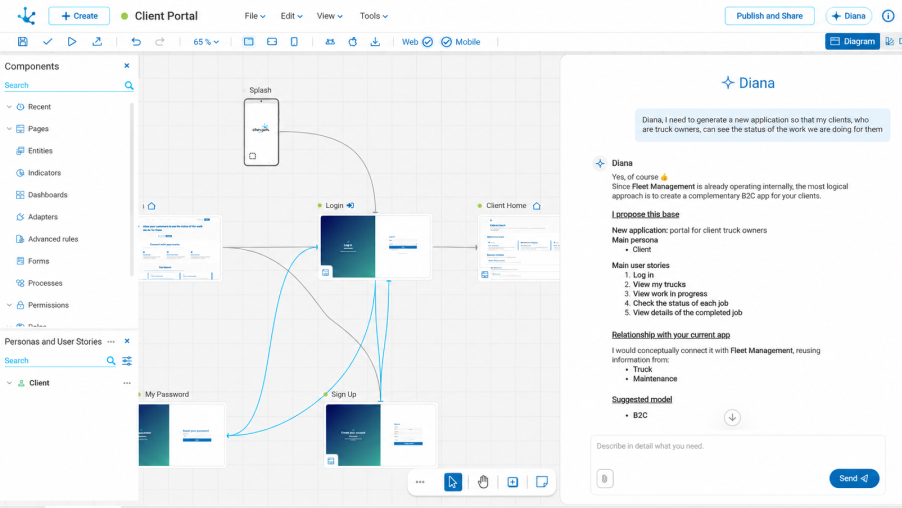
With a prompt-first approach, users can begin by describing in natural language the application they need. DIANA interprets the requirements, understands the business context, and proposes a structured solution by generating the main objects that make up the application, such as entities, pages, actions, and visual elements.
From that point on, the application can evolve by combining two complementary ways of working: Deyel's visual low-code modeling and natural language interaction with DIANA. This accelerates the initial development process without sacrificing the control, flexibility, or maintainability required for enterprise applications.
Deyel 9.3 also introduces new components for managing information, automating navigation flows, and centralizing access to the context of each instance. These enhancements are complemented by improvements to the design system, rule modeling, and citizen developer training.
The result is a more agile, intelligent, and accessible development experience that enables ideas to be transformed into complete applications in less time and with greater autonomy.
New
DIANA as a Copilot for Application Development
DIANA as a copilot for application development introduces a prompt-first approach that allows the process to begin from a business need expressed in natural language. Based on this interaction, DIANA interprets the business context and proposes the complete application structure, including its main objects in an integrated way.
This new approach not only accelerates the initial stage but also redefines how solutions are built in Deyel. Applications are no longer conceived as a collection of isolated objects but as a cohesive whole from the very beginning, combining AI-assisted generation with visual low-code modeling for ongoing evolution and maintenance, achieving the right balance between development speed and long-term sustainability.
Key Highlights
- Simpler and more seamless experience
The team of agents has been replaced by DIANA as the primary assistant, simplifying communication and reducing friction during interactions with application modelers. - Enhanced support for B2B applications
DIANA significantly improves its ability to assist in modeling more complex B2B applications, providing greater detail and a deeper understanding of entities, pages, and actions. It can also generate visual elements of the application, such as its icon. - Intelligent object reuse
DIANA can identify whether the application being created is related to existing applications and, when appropriate, suggest reusing previously defined objects. - Improved B2C application modeling
Page generation for B2C applications has been enhanced, making it possible to model different types of experiences, from landing pages and homepages to management pages and entity CRUD interfaces. - Image and diagram generation
DIANA can now generate images and diagrams that improve the understanding of modeled applications, including entity-relationship diagrams to visualize the data structure and its relationships. - AI model upgrades
The artificial intelligence models used by DIANA have been updated, incorporating more advanced capabilities for understanding requirements and assisting in application modeling.
Table Element for Data Management in Entities and Pages
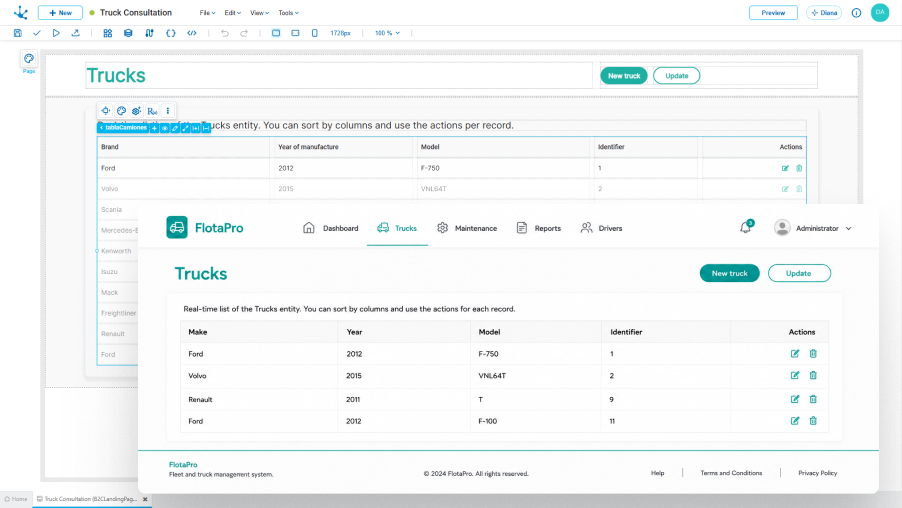
The Table element is now available in the entity and page modelers. It is designed to visualize, edit, and manage information from a Deyel data source through a configurable row-and-column interface.
This element enables the creation of modern, adaptable tables focused on both data viewing and editing, providing an experience aligned with enterprise applications. Its modular design, together with editing, sorting, pagination, and customization options, makes it easier to create more efficient, intuitive, and scalable user experiences.
Its incorporation expands the modeling capabilities of pages and entities, enabling the creation of more complete, dynamic, and information-centric interfaces.
Key Highlights
- Tabular data visualization
Displays information from a data source organized into rows and columns, making it easier to read, search, and manage large volumes of information. - Modular structure
The Table consists of a header, columns, rows, cells, actions, and a placeholder, allowing each part to be configured independently while maintaining a flexible structure. - Configurable columns
Each column can be defined according to its source field, displayed title, cell type, sorting, visibility, and scrolling behavior, adapting to different usage scenarios. - Direct instance editing
Allows data to be modified directly within the table, with options such as starting in edit mode, always-editable rows, and rapid data entry using empty rows. - Data actions
Each row can include actions such as edit, delete, or add instances, with either permanent or contextual visibility depending on user interaction. - Management of large data volumes
Includes features such as configurable pagination, infinite scrolling, and control over the number of visible records, optimizing both performance and user experience. - Column resizing
Enables dynamic adjustment of column widths at runtime, adapting to each user's needs. - Customizable placeholder
Allows configurable content to be displayed when no data is available, including messages, images, icons, or other components. - Modeling operations
Includes actions to create and duplicate columns, preview the placeholder and edit mode, and expand the table within its container, streamlining the modeling process.
Intelligent and Automated Navigation Flows Using Hyperlinks
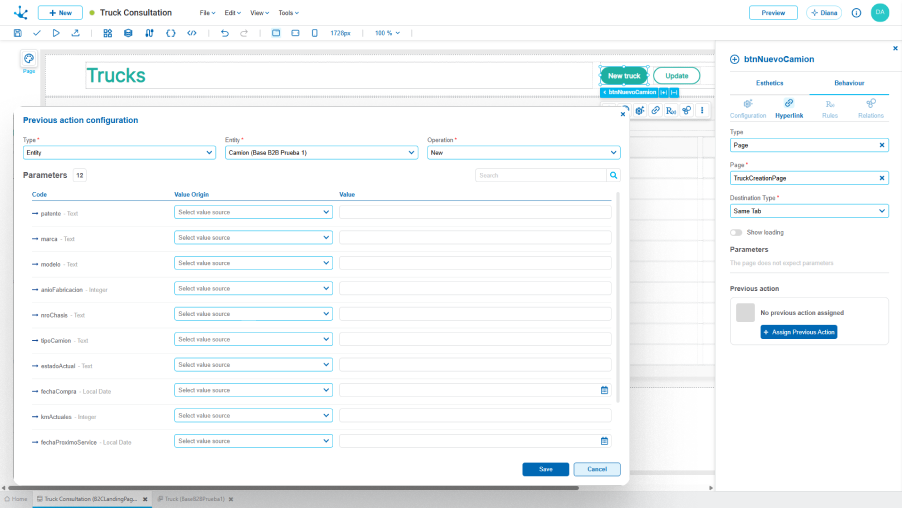
The ability to configure pre-navigation actions for hyperlinks in the page and entity modelers allows operations to be executed before the defined navigation takes place.
This functionality expands modeling capabilities by integrating entity operations and business rule execution into the navigation flow, simplifying configuration and reducing the need for additional logic.
Key Highlights
- Execution before navigation
Actions are executed automatically before the navigation associated with the hyperlink. Once successfully completed, the configured navigation continues, allowing operations to be chained within the same flow. - Support for entities and rules
Allows operations to be executed on both entities and business rules through REST APIs, covering everything from simple persistence scenarios to more complex use cases. - Entity operations
Supports actions such as creating, updating, and deleting instances, with specific configurations for each type of operation. - Flexible parameter configuration
Actions allow input and output parameters to be defined, with values sourced from fixed values, variables, page elements, or entity fields. Results can be reused in subsequent steps of the flow. - Support for iterative structures
Create and update operations support iterative structures, making it possible to work with data from components such as tables or repeaters and dynamically build collections of information. - Business rule execution
Allows previously defined rules to be invoked, with their parameters automatically available for configuration. Compatibility with complex structures, such as lists or arrays, is ensured through appropriate components. - Automatic result updates
After an action is completed, variables or page elements can be automatically updated using output parameters, ensuring seamless flow continuity without additional configuration. - Secure error handling
If an execution error occurs, the user is notified, navigation is canceled, and data updates are prevented, ensuring consistency and flow control.
Centralized Access to Instance Information
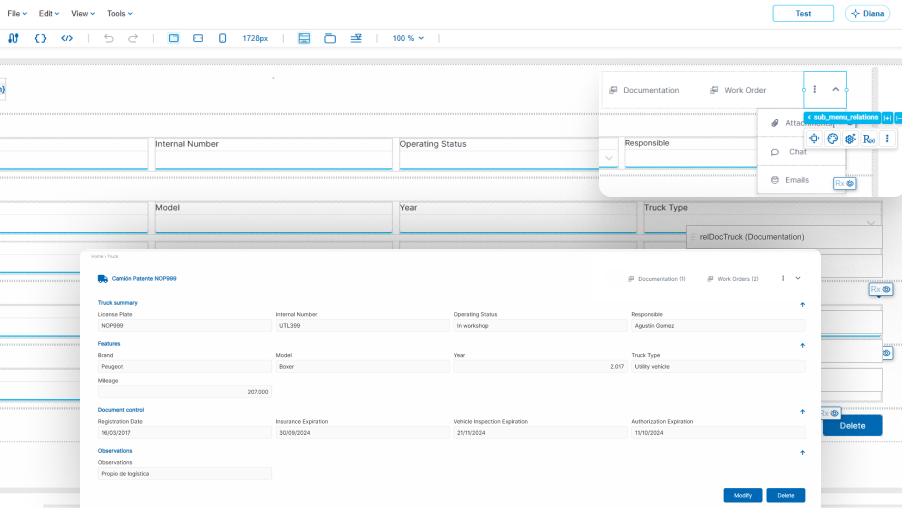
The new modelable Relationship Navigation element is designed to centralize access to all information associated with an entity instance.
This element allows a navigation menu to be configured directly from the modeler, bringing together related entities and contextual resources such as attachments, conversations, case information, and email messages. This enables users to quickly access all information associated with the selected instance.
Key Highlights
- New modelable element
Relationship Navigation is introduced as a new element available in the entity modeler's elements section. - Centralized access to related entities
Allows navigation to related entity instances from a single access point, simplifying the exploration of linked data. - Visual configuration from the modeler
The component automatically identifies the entity's available relationships. Modelers can choose which ones to display and organize them according to the application's needs. - Flexible content organization
Relationships can be displayed horizontally in the main bar, vertically in a dropdown menu, or through a combination of both for greater visibility and accessibility. - Access to additional features
The menu can include shortcuts to additional functionality such as instance attachments, associated chat, case information, or related emails. - Greater productivity for end users
Reduces the number of clicks required and centralizes the instance context in a single location, making navigation easier without changing screens. - Consistent experience between modeling and runtime
The configuration defined in the modeler is automatically reflected in the running application, preserving the established organization.
Enhancements
Centralized Spacing Management in the Design System
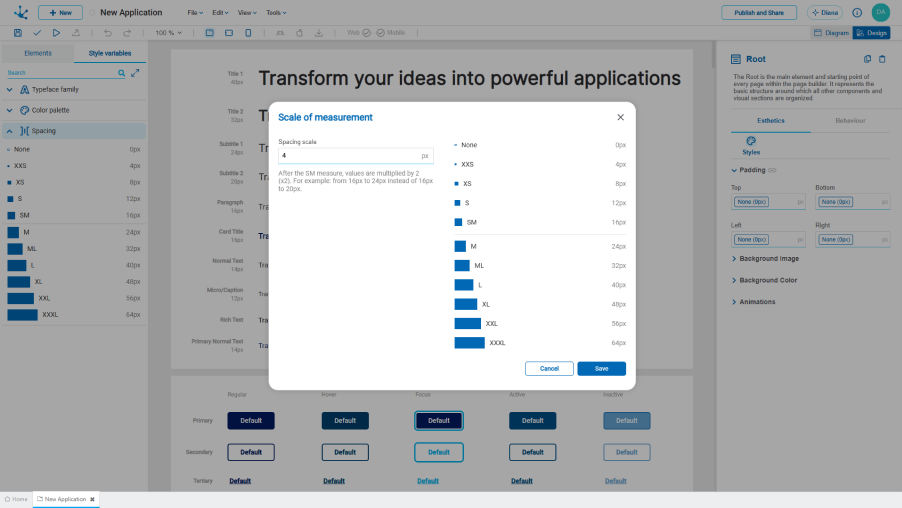
Deyel now allows application spacing to be managed centrally through the design system using a new set of spacing variables.
This functionality enables spacing and padding values to be defined and reused without manually configuring units, improving visual consistency and simplifying interface maintenance.
Key Highlights
- Predefined spacing variables
A new category of variables has been introduced to represent different spacing levels (XXS, XS, S, M, L, XL, among others), allowing abstract values to be used instead of numeric measurements. - Centralized configuration
Variables are managed from a single location within the design system and reused across all compatible elements, ensuring consistency throughout the application. - Use in layout properties
Spacing variables can be applied to properties such as padding, item spacing, labels, and menus, simplifying layout configuration without manipulating pixel values. - Global spacing scale
Allows the definition of a global scale based on a base value, from which all spacing levels are automatically calculated, maintaining a consistent visual hierarchy. - Automatic interface updates
Changes to the global scale are automatically reflected in all elements that use these variables, both within the design system and in existing pages and entities. - Quick operations from the modeler
Elements include actions to increase or decrease spacing levels directly from the modeler, streamlining design adjustments. - Smart backward compatibility
The system automatically identifies existing spacing values and associates them with variables whenever possible. Otherwise, it preserves the original values while indicating those that require review.
Improved Experience for Creating and Maintaining Rules
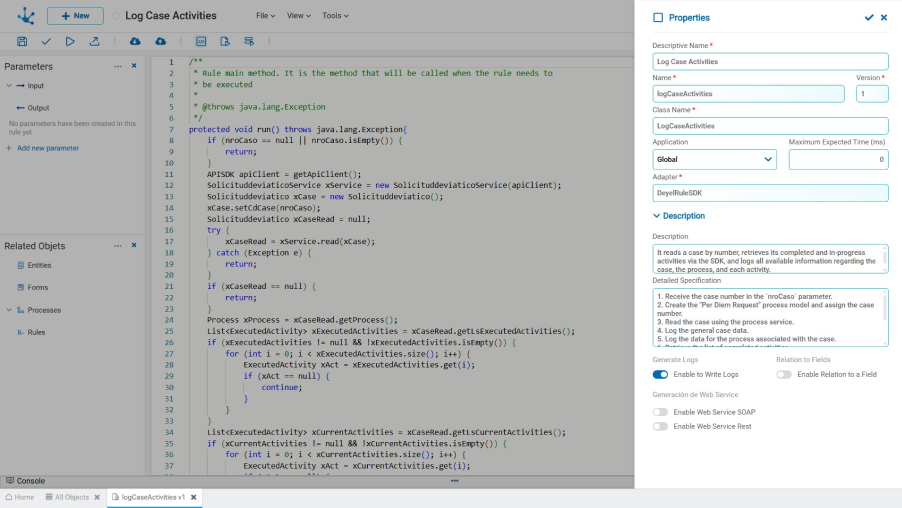
Changes have been introduced to the interface and property access from the "Tools" menu in the rule modeler. These improvements enhance the user experience when creating and managing business and integration rules, powered by DIANA, the AI assistant that makes modeling more intuitive, agile, and guided.
These enhancements are designed to simplify interaction, reduce operational complexity, and provide greater clarity throughout the entire rule lifecycle.
Key Highlights
- New access to properties from the "Tools" menu
Opening the "Properties" option in the "Tools" menu displays a new panel on the right side of the workspace, providing clearer and more direct access to the properties that define the rule. - Clearer display of rule fields
The new panel organizes property fields in a more accessible way, making them easier to read, understand, and edit without navigating through multiple views. - Optimized screen space usage
The description section is collapsed by default, making better use of available space and reducing visual clutter. - Expandable interaction on demand
The description section can be expanded with a single click, providing detailed information only when the user needs it.
Citizen Developer Plus Introduces Prompt-First Development with DIANA
Deyel Citizen Developer Plus has been redesigned to prepare participants for the new way of developing applications with Deyel, incorporating DIANA as a copilot throughout the entire process of building and evolving a solution.
The training adopts a prompt-first approach: development begins by expressing a business need, process, or idea in natural language. Based on this definition, DIANA helps interpret requirements, design the solution, and generate the application's main objects in an integrated way.
Starting from this initial version, participants learn how to review, refine, and evolve the solution by combining two complementary ways of working: natural language interaction with DIANA and Deyel's visual low-code modeling. As a result, the course goes beyond teaching how to use the modelers, showing participants how to collaborate effectively with artificial intelligence while maintaining full control over the application's structure, behavior, and evolution.
The training is part of the Deyel Learning Paths and is specifically designed for implementers, business analysts, citizen developers, and developers who want to transform business needs into complete applications with greater speed, autonomy, and long-term adaptability.
Key Highlights
- DIANA as a copilot throughout the development lifecycle
DIANA supports the application modeler from analysis through application evolution, assisting with requirement interpretation, solution design, and component generation within the platform. - Integrated development methodology
The course introduces an approach that combines three key dimensions: business understanding, visual modeling, and applied artificial intelligence, empowering the role of the citizen developer. - Greater autonomy for citizen developers
The course approach enables non-technical and semi-technical profiles to build complete applications with less dependence on specialized teams. - Build, deployment, and environment promotion
The course includes content related to application build, deployment, and best practices for promoting applications across environments, supporting a more organized and controlled lifecycle management process. - Monitoring with execution consoles and logs
The course introduces the use of execution consoles and logs, enabling participants to monitor application behavior, analyze results, and identify opportunities for improvement. - Hands-on experience with instructor guidance
The training includes an instructor-led workshop where participants apply what they have learned in a guided case, interact with DIANA, and receive direct feedback.