


Deyel 9.1
November 21, 2025Deyel 9.2

New
DIANA Revolutionizes Page Creation
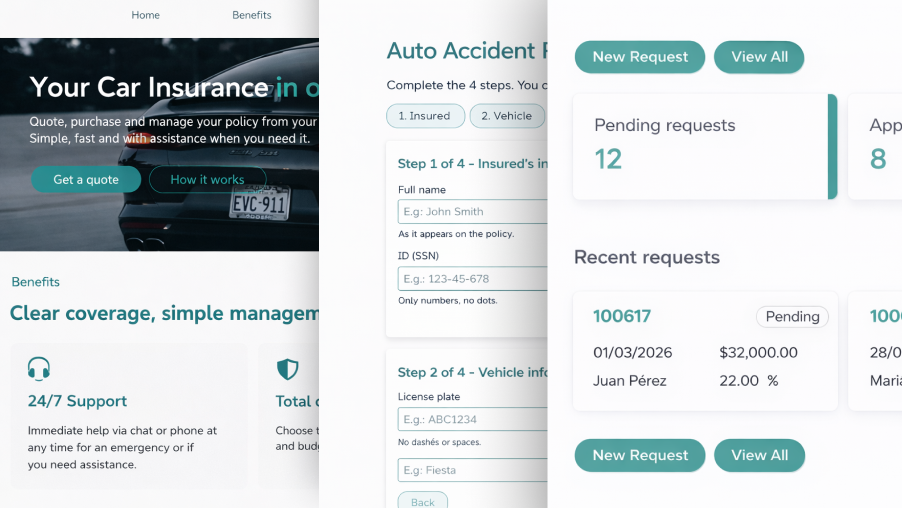
Diana expands its capabilities by incorporating the possibility of generating new types of pages with a high level of creativity, design, and visual quality.
From simple instructions, or even from a reference image, it is possible to design modern, functional, and high-quality interfaces in an agile way, significantly reducing the effort required to create new pages.
In this way, the interface design process is simplified, reducing the effort required to create new pages and allowing consistent visual results to be obtained from early modeling stages.
Page types and design optimization
Diana was trained to excel in four key page generation scenarios, optimizing both design times and associated costs.
- Landing Pages for B2C applications
Allows the creation of home pages oriented to the application user, with modern and attractive designs that facilitate interaction and access to its services. - Home Pages for B2B applications
Facilitates the design of structured and professional initial portals, suitable for corporate environments and focused on displaying relevant information for business operations. - Pages for form management (CRUD)
Enables the generation of complex entity management screens, improving the experience of data entry and administration through functional and usable interfaces. - Pages generated from images
Allows interpreting sketches or reference designs to automatically transform them into structured pages ready for use within the application.
Conversational Creation and Modification of Value Lists with DIANA
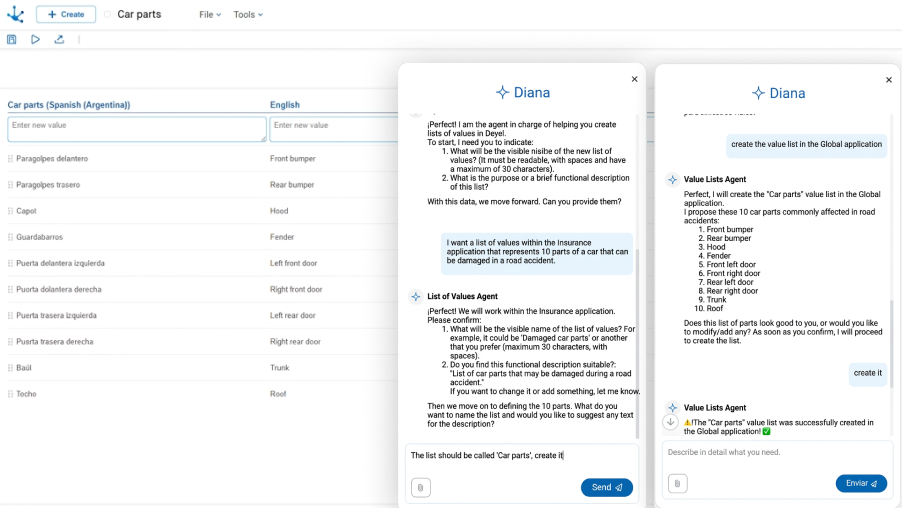
It is possible to create and modify value lists conversationally through the AI assistant Diana. This functionality incorporates a specialized agent that guides the step-by-step modeling of value lists, eliminating the need to resort to external sources to obtain values. Complete lists can be created by leveraging the advantages of artificial intelligence, optimizing time and improving data consistency.
Key Highlights
- Conversational assistant of the specialized agent
The user is guided step by step by Diana, facilitating the definition of value lists and their attributes in a natural and intuitive way. - Intelligent suggestions
Diana can suggest and automatically complete the most relevant values according to the type and purpose of the required list. - Reduction of time and errors
The time dedicated to modeling lists is minimized, eliminating the need for manual searches and data entry, thus reducing possible inconsistencies. - Customization and Flexibility
Allows the modeler user to add or modify values, translations, and relationships between lists, adapting the result to business needs. - This improvement enhances the work of modelers in Deyel, making the process of creating and managing lists much faster, more precise, and simpler for everyone.
Entity Modeling from an Excel File
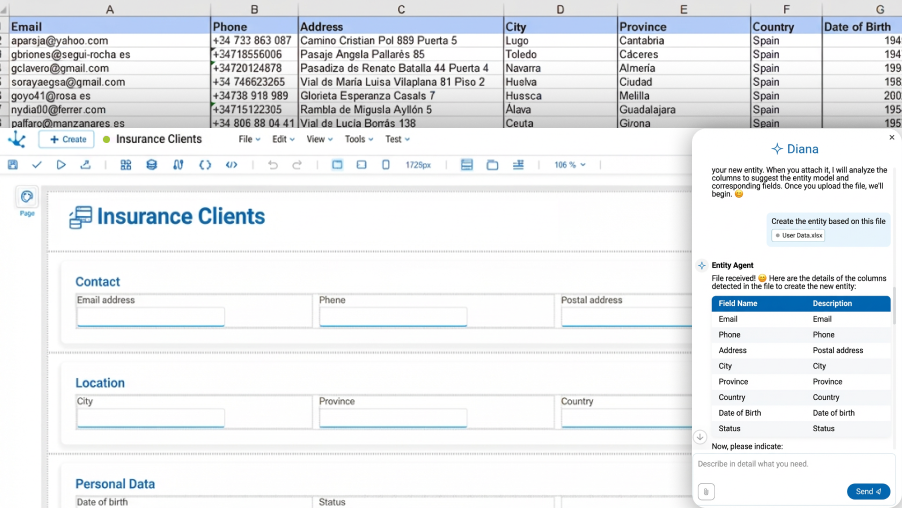
A new functionality is introduced that allows entities to be created directly from an Excel file. This capability, integrated with Diana, facilitates the modeling of data structures in an agile and assisted way.
By attaching an Excel file, Diana automatically analyzes its format, identifies the columns, and proposes the creation of the corresponding fields within the entity. Optionally, it is also possible to import and populate sample data from the same file, simplifying the initial data load.
The process is carried out in a conversational and guided manner, with intelligent suggestions and automatic validations that optimize the definition of the data model and reduce possible inconsistencies.
This capability marks a before and after in the way of working with entities in Deyel, and is designed to obtain fast, precise, and easily scalable results.
Key Highlights
- Significant reduction in modeling time
Allows entities to be created in a matter of minutes from existing files. - Automatic import of structure and data
Minimizes manual errors by generating fields and, optionally, incorporating initial information from the file. - Conversational experience guided by Diana
The Diana-assisted interface accompanies the modeler user intuitively, validating the consistency of the model. - Especially useful for migrations
Ideal for projects that already have structured data in spreadsheets and require quick integration into the platform.
New User Experience in the Process Modeler
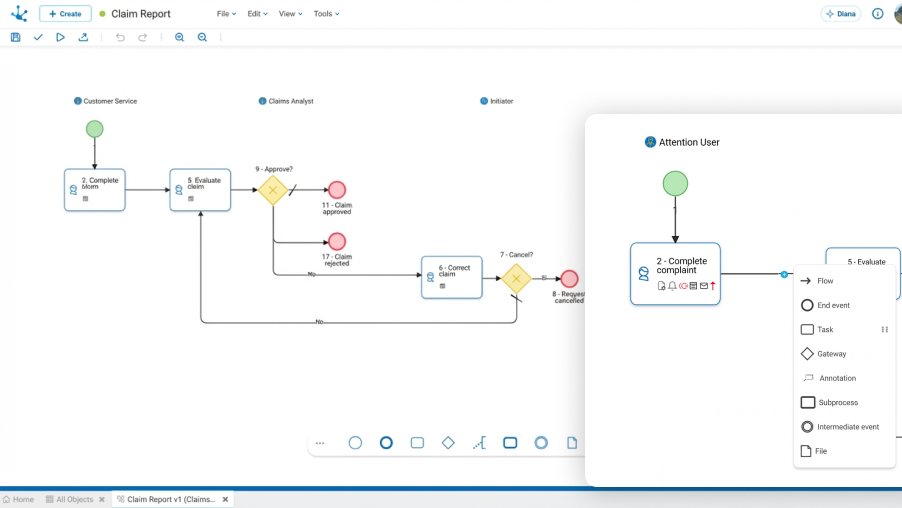
The process modeler presents a comprehensive evolution of the user experience, incorporating not only a modernization of the visual aesthetics, but also significantly improving clarity, navigability, and accessibility to key configuration information.
The redesign was conceived to simplify the reading of diagrams, reduce visual noise, and provide greater operational context directly on each element, enabling more efficient and precise modeling.
Key Highlights
- New component view
Incorporates a renewed process view, allowing a quick understanding of how it is organized. - Visual update of elements
Complete redesign of the interface of each process element, aligned with the new visual identity of the product. - Borderless lanes
Cleaner and simpler diagrams, improving visual interpretation of the flow. - Circular contextual menus ("pie type")
Pie-type contextual menus on each element streamline access to frequent actions. - Redesigned sidebar
Palette of elements adapted to the new UI of the modelers, providing greater consistency in the user experience. - New contextual iconography in activities
Quick visualization of key information directly on each activity, including:- Linked entity
- Configured actions (email sending, advanced rule execution, message sending)
- Active alerts
- Priority level
- Disabled actions
- Visible organizational context
Display of the photo of the participant responsible for the lane, providing greater clarity about assignment and responsibility within the process.
Centralized Platform Administration
A new administration console is introduced that centralizes platform management and facilitates operational control of applications developed with Deyel.
From this space, it is possible to manage in a unified way the resources and configurations necessary to ensure the proper functioning of the environment. The console brings together key tools so that citizen developers, administrators, and security managers can manage applications, monitor their execution, and define environment configuration policies in an agile and organized way.
The console allows viewing the status of applications, monitoring executions, and managing different aspects of the environment, such as users, roles, environment properties, email accounts, repositories, calendars, and scheduled tasks.
As a complement to this functionality, the platform includes a home page that organizes access to the main work areas, such as platform knowledge, application creation and administration, and facilitates access to the administration console and modeling tools, including the use of Diana as an intelligent assistant within the workflow.

Key Highlights
- Centralized platform administration
The new console brings together in a single place the tools necessary to manage the environment, manage applications, and configure platform resources. - Comprehensive application management
Allows viewing, monitoring, building, and installing modeled applications, facilitating lifecycle control of each one. - Monitoring and activity control
Includes tools to review executions, analyze system events, and monitor user activity within applications. - Advanced security management
Centralizes user management, along with role and job position assignment, facilitating the implementation of security policies. - Execution environment control
Allows configuring key environment properties, including email accounts, repositories, log level, calendars, and scheduled tasks. - Organized access to resources and tools
The platform includes a home page that organizes access to main work areas and facilitates entry to the administration console, application modeler, and documentation resources.
Menu Element in Entity and Page Modelers
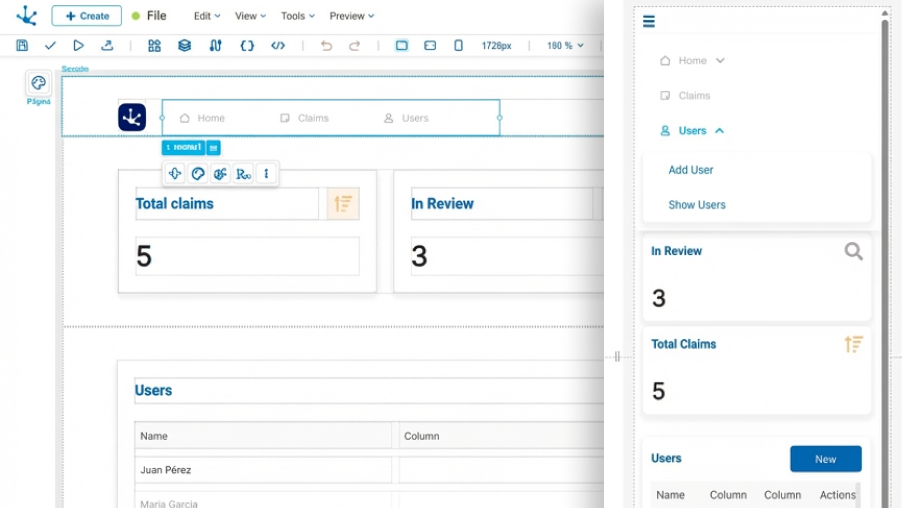
A new draggable element is incorporated into the entity and page modelers, designed to structure and manage navigation within applications in a flexible, hierarchical, and fully configurable way.
This new element enables the creation of modern navigation experiences adaptable to different layouts and interaction patterns, significantly expanding the interface design capabilities within the platform.
Key Highlights
- Multiple display formats
The menu can be configured in different presentation modes: horizontal, vertical, and hamburger. - Hierarchical and flexible structure
The new element consists of navigation options that can include icon and text. Each option can contain submenus with multiple levels, allowing more complex structures. - Configurable submenus
Submenus can be defined according to the selected menu type and configured to be displayed on click or hover. - Clear content organization
Within submenus, it is possible to include both navigable options and visual groups that facilitate content separation and organization. - Minimized mode
The menu can be reduced to display only icons, optimizing interface space without losing accessibility.
Treeview for Objects and Parameters in the Rule Modeler
In version 9.2, a new TreeView is introduced within the Advanced Rule Modeler, allowing faster and more direct visualization and management of parameters and objects associated with a business rule.
From now on, it is no longer necessary to access the tools menu to consult linked objects or to create or modify parameters. All this information is available directly in the workspace, along with the corresponding operations for each element, improving visibility and accelerating development.

Key Highlights
- Centralized visualization of objects and parameters
A new panel is incorporated on the left side of the workspace, from where it is possible to easily visualize objects associated with the rule and understand their parameters. - Extended technical information
For each associated object, the name of the Java class that represents it can be seen, providing greater technical context during development. - Real-time status query
Allows knowing the state of the object directly from the modeler, without the need to navigate to the main Deyel grid.
Diana Capabilities Integrated into the Rule Modeler
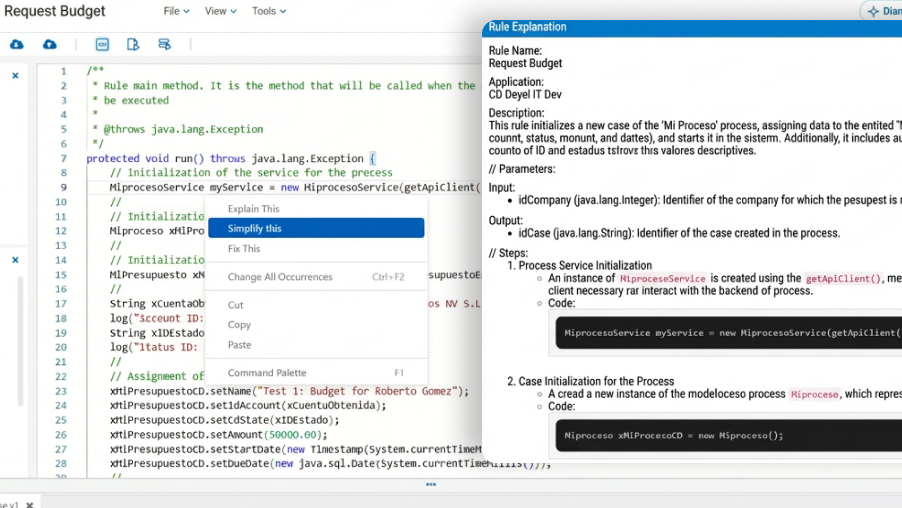
A set of Diana functionalities is incorporated directly into the Rule Modeler, integrating artificial intelligence capabilities within the code editor itself and the tools menu.
In addition to conversational assistance for generating business rules, it is now possible to interact with intelligent features without leaving the development environment. This enables optimization of writing, understanding, and improving code in an agile and contextual way.
With a single click, it is possible to request corrections, simplifications, or explanations of specific fragments, improving productivity and reducing analysis and debugging time.
Key Highlights
- Smart functions within the editor
Actions similar to advanced programming assistants are incorporated, such as fix this (fix code), explain this (explain code), and simplify this (simplify logic). - Functional explanation of complete rules
From the tools menu, the "Explain rule" option can be executed, generating a clear functional description of the implemented logic. - Integrated contextual assistance
AI capabilities are embedded in the modeling environment, allowing work without interrupting the development flow.
Improvements
Profile Management and Invitation Sending in Applications
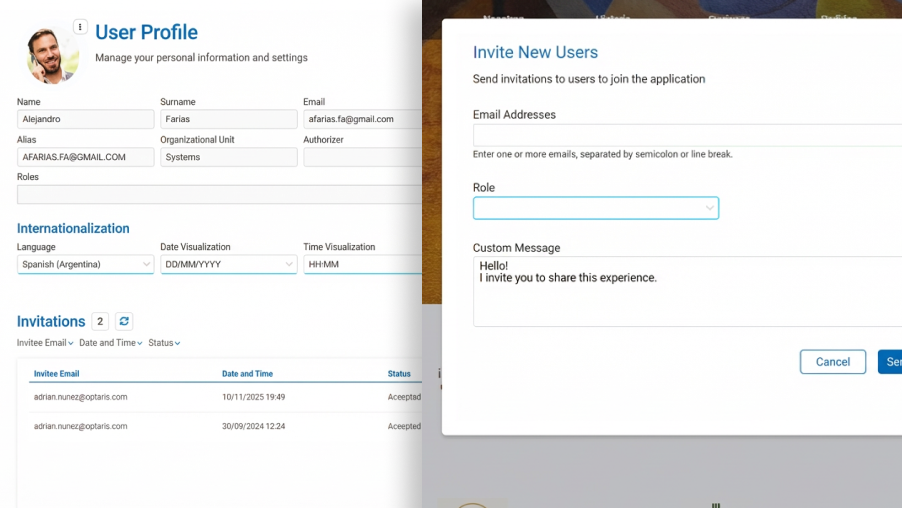
The execution of applications modeled with Deyel now incorporates a renewed experience for managing the profile of the logged-in user and for inviting new users to the platform, all directly from the application interface itself. This simplifies these functionalities and makes them more agile and lightweight.
Key Highlights
- Simplified user invitation
Application users can easily invite new people to join the platform. A renewed invitation page is introduced where it is only necessary to indicate email addresses, the assigned role, and a personalized message. - New user profile in applications
A simpler and more modern profile page is introduced, allowing viewing and editing of basic information of the logged-in user. Available data includes photo, name, email, alias, organizational unit, and role. - Preference and activity management
From the new profile, users can configure their language and format preferences, such as date, time, and decimal and thousand separators, as well as view the status of sent invitations. - Availability in all templates
These functionalities are available in all application templates: B2C, B2B, Credits, Claims, and Insurance Sales. - Flexibility for modelers
The new pages are optional and modelable, supported by Deyel’s own rules. By using the platform’s standard functionality, they maintain full extensibility and scalability, allowing the incorporation of any other feature available in Deyel.
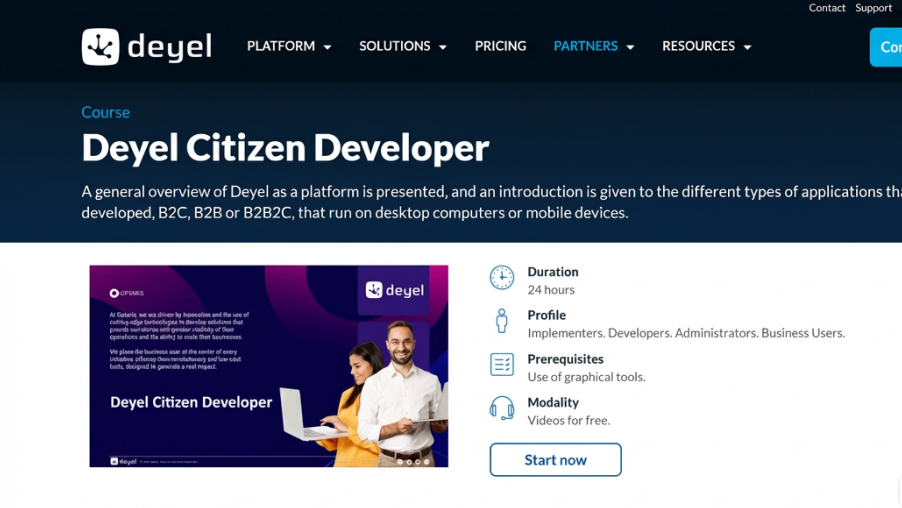
Fully Renewed Training for the Citizen Developer
The training has been completely updated to accompany the evolution of the platform in version 9.2. The content has been modernized by incorporating the new functionalities of Deyel and, especially, the integration of Diana, the artificial intelligence assistant, into application modeling.
The videos have been renewed to reflect this new working experience, showing real scenarios where Diana intervenes in the generation of applications, entities, pages, and integrations, enhancing the productivity of the Citizen Developer.
Key Highlights
- Content aligned with the new version
All modules have been updated according to the most recent capabilities of the platform. - Modernization of videos
Audiovisual materials have been renewed to reflect the new interface, usability improvements, and AI-powered features. - Practical and modern approach
Step-by-step examples are included, demonstrating how artificial intelligence accelerates modeling tasks, reduces errors, and simplifies complex configurations. - Optimization of the learning process
Emphasis is placed on how new functionalities allow faster application development, minimize errors, and raise the technical standard of implemented solutions.