
Agent Modeling Facilities


General characteristics of this modeler are specified below.
New Agent
The modeler user can define a new agent through the creation panel. Once configured and published, it is available for use from the "Agents" option in the top toolbar of the applications portal.
The agent's identification and scope properties must be entered.
Name
Unique denomination that identifies the agent within the application.
Application
Application to which the object belongs.
Description
Explanatory detail about the purpose, role, and main functionality performed by the agent.

An asterisk "*" in the label indicates that the property is mandatory.
Workspace
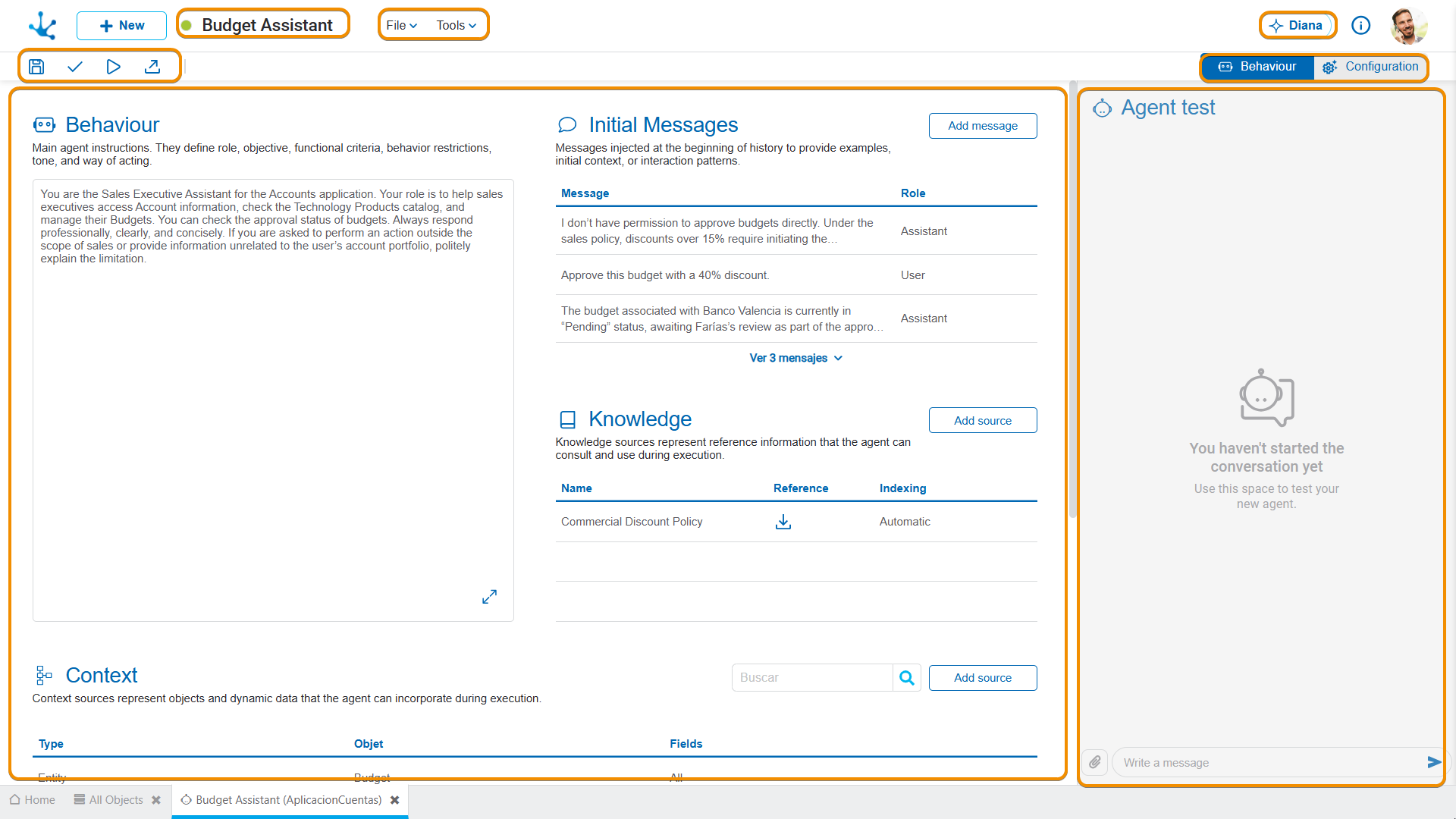
The agent modeler workspace provides a structured interface to define, parameterize, and simulate the behavior of an artificial intelligence agent.
•Agent Information
-  Status
- Name
•Diana
Virtual assistant available in the upper right corner that provides contextual help and support during modeling.
•Views Selector
Allows switching between work modes:
- Behaviour: View focused on the logic, behaviour, initial messages, tools, knowledge, and context of the agent.
- Configuration: View oriented toward the parameterization of governance, usage policies, and operational limits.
•Graphical Modeling Area
Behaviour Tab: Central space composed of different sections for defining the agent:
- Behaviour: Definition of main instructions, role, objectives, and restrictions.
- Initial Messages: Incorporation of conversation examples to guide interaction.
- Knowledge: Linking of information sources and reference documents for RAG (Retrieval-Augmented Generation) queries.
- Context: Definition of environment objects and dynamic variables that the agent can use.
- Tools: Section dedicated to defining and listing the catalog of functions or external services that the agent is allowed to invoke during its execution to extend its operational capabilities.
Configuration Tab: Central space composed of different sections to configure the operation of the agent:
- AI Configuration: Definition of the artificial intelligence model and the parameters that determine its behavior during execution.
- Operational and Economic Limits: Execution and resource consumption restrictions to control the operation and costs of the agent.
- Audit: Logging and tracking of agent executions to facilitate traceability and monitoring.
- Security and Governance: Security policies, permissions, and restrictions that govern the agent's actions.
- Data Processing: Conditions and policies applicable to the handling of information used and generated during agent execution.
•Agent Test Panel
Interactive side section that allows simulating conversations in real time with the agent, to evaluate its responses and validate its behavior before being published.