

App Build and Changes


Through the building and deploying applications functionality, Deyel facilitates continuous application integration by enabling an organized promotion of changes across environments. The result of building an application, whether complete or just changes, is a package (.zip file), which will later be used in the installation.
The build generates an installable package that includes the configuration data and objects selected by the user.
A build is a collection of selected objects and entity data that needs to be installed in an environment.
A construction may contain:
•One or more complete applications, with all their objects.
•Selected objects, belonging to one or more applications
•Entity data.
State Diagram in a Build
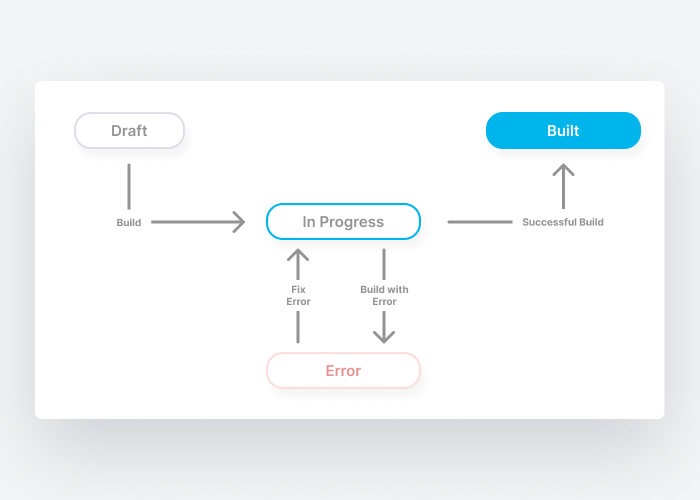
Possible states of a build:
•Draft: the build was partially saved by the user.
•In Progress: Deyel is processing the request and generating the package.
•Built: build was completed successfully.
•Error: The build failed and an error occurred.