

Column


Defines how each field of the data source is presented. In each column, it is possible to configure the title that is viewed, the type of display, and its behavior within the interface.
Configuration Properties
The column properties are displayed.
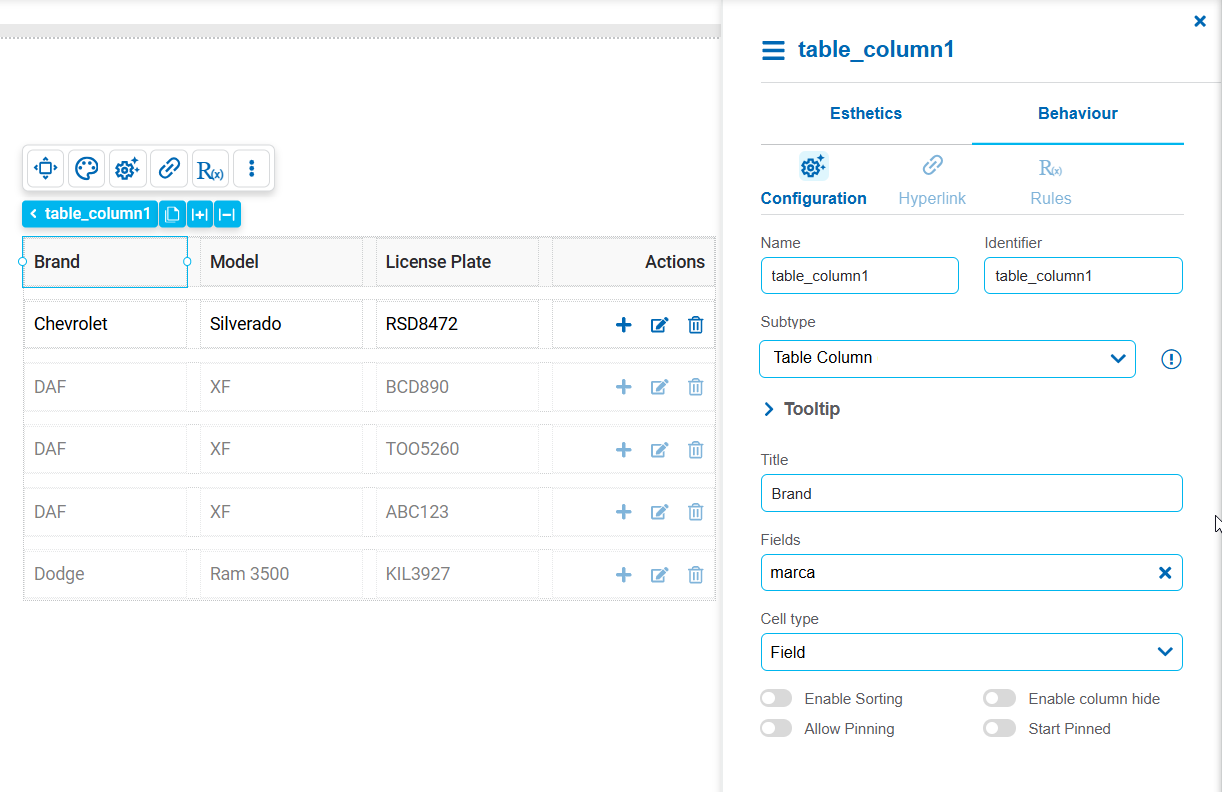
General properties: Name , Identifier and Subtype.
Title
Visible text displayed in the column header.
Fields
Selects the data source field to be displayed in the column. Each column is linked to a single field (for example: name, date, state, or amount),
whose value is displayed in all the table rows. If the column is editable, the updates made by the user are saved in this same field.
Cell Type
Defines how the column content is displayed in each cell.
Possible Values
•Text: Displays the content in read-only mode, without enabling its edition from the table. Recommended for informational columns.
•Field: It displays an editable field that allows users to modify the value directly within the table. Ideal for quick data loading or editing.
Enable Sorting
Enables sorting of records in ascending or descending order by clicking on the column header during execution.
Enable column hide
Allows users to temporarily hide the column during execution to simplify display, with the option to view it again whenever needed.
Allow Pinning
Keeps the column fixed during horizontal scrolling at runtime, making it easier to read and compare key data.
Start Pinned
Defines whether the column is pinned when the table is initially loaded.