

Table Actions


Enables users to configure the available operations on the table records, defining the actions they can perform during execution.
Configuration Properties
Displays the properties of the table actions.
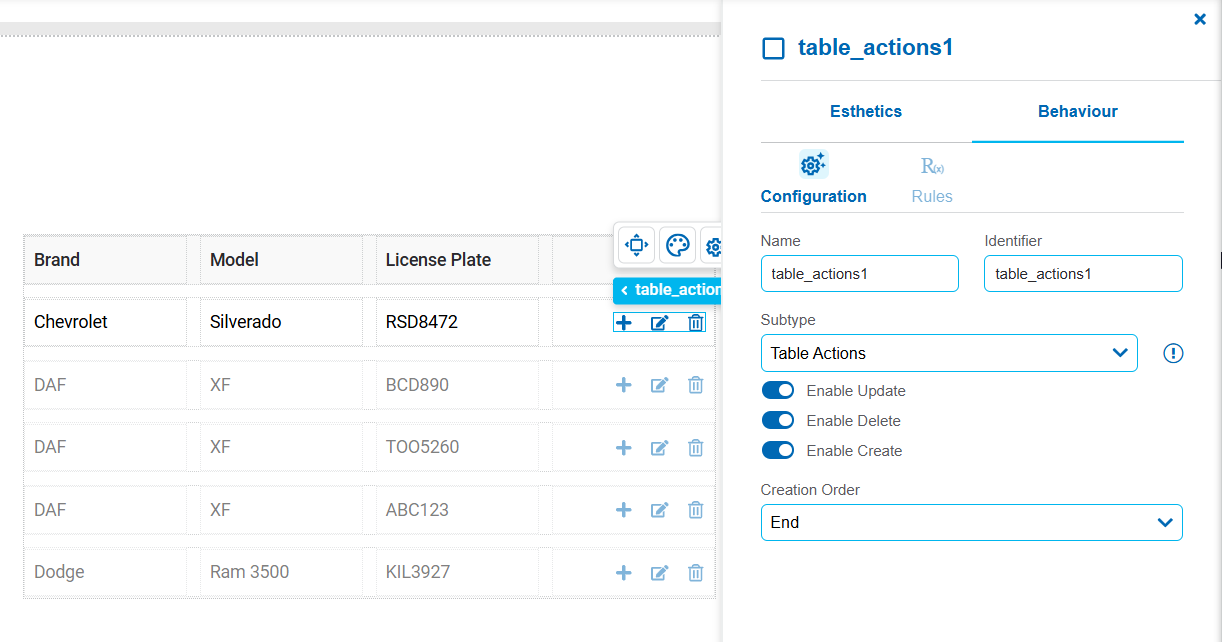
General properties: Name , Identifier and Subtype.
Enable Update
Enables editing of existing records. When this option is enabled, the icon is  is displayed in each row. In entities, this icon is not visible because editing is always enabled. On the pages, the icon is only displayed when the property Enable update is enabled and Always editable is disabled.
Enable Delete
Enables the deletion of records. When this option is enabled, the icon  is displayed in each row.
Enable Create
Enables the creation of new records within the table. When this option is enabled, the icon  is displayed to add new records.
Creation Order
Defines where a new row is placed when a record is added to the table.
Possible Values
•Start: Adds the new row to the beginning of the table.
•End: Adds the new row to the end of the table