
Spacing


Spacing defines the distances used to separate elements or create padding within the user interface.
Using a scale of reusable variables helps maintain a uniform visual layout throughout the application, ensuring design consistency and facilitating updates from a single configuration point.
Spacing variables are used by the design system to define padding, item spacing, label spacing, menu spacing, and other properties of the various components. Instead of using a value in pixels, these properties use a spacing scale variable. The same variables are subsequently used in entities and pages, ensuring the visual consistency of the application.
The spacing configurations can be found in the style Variables section of the left panel.
By clicking on  Spacing, a container is displayed showing the variables that make up the spacing scale along with the pixel value assigned to each one.
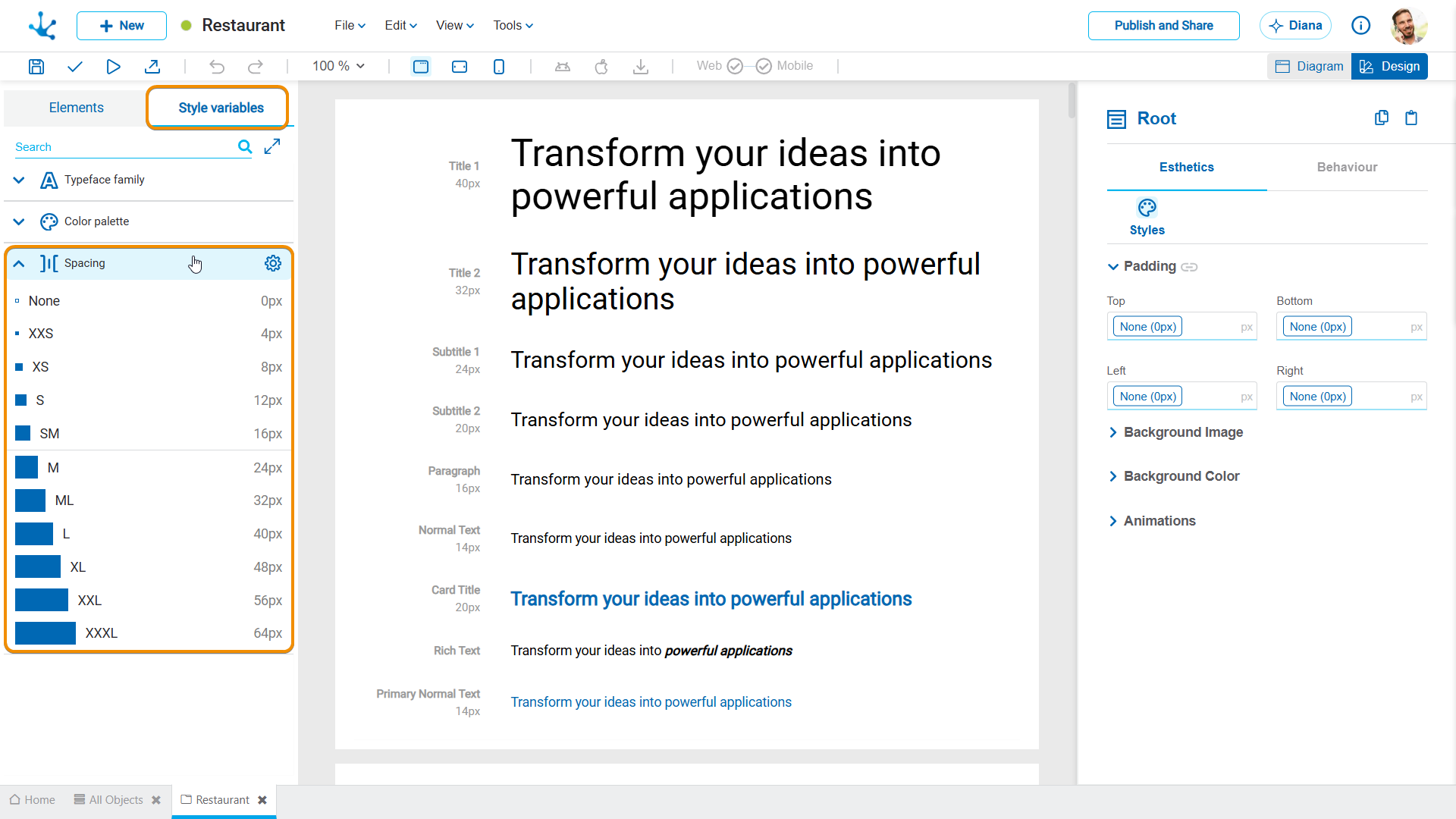
When hovering over Spacing displays the icon  , allowing the base spacing value to be modified.

By modifying this value, the system automatically recalculates the pixel values of all variables on the scale, maintaining the defined proportion between them. This makes it possible to adjust the spacing throughout the interface consistently, without having to modify each variable individually.